Modo convenciónManeja el stand desde tu teléfonoFila con números, apartados de flash, pagos con tarjeta y consentimientos firmados.Ver convenciones
Mapa
ArtistasEstudiosConvencionesGuest spotsEventos de estudioColaboraciones

Artistas, estudios, convenciones y guest spots cerca de ti o a donde vayas.

Abrir el mapa
DestinosPlanea un viaje de tatuaje por ciudad.
Studios · front desk

Kiosk mode for walk-in studios

It's Saturday. Ray S. walks in wanting a piece off the flash wall, and Maya has an hour left on a back piece. Before she's free, Ray needs to sign a waiver, show his ID and get checked in. The kiosk on your counter handles it. Your front desk keeps working.

Kiosk mode is on every plan, Free included.

Tap through the kiosk01 / 07 · Welcome02 / 07 · Walk-in03 / 07 · Confirm04 / 07 · Waiver05 / 07 · ID check06 / 07 · Checked in07 / 07 · Pay07 / 07 · Pay07 / 07 · Pay
Front deskCheck-in
Tattoo studio

Your studio

Maya RiveraNina VosCal Brennan
Book an appointment Browse merchandise
Powered by CREW.INK
Front deskCheck-in
Step 1

Find your appointment

Enter the details used for your booking, or start a walk-in check-in.

Existing appointmentWalk-in
NameRay S.
Email (optional)you@example.com
What happens next
  1. 1The artist will be notified that you're here.
  2. 2Review and sign the studio waiver.
  3. 3Complete any required ID verification.
Front deskCheck-in
Step 2

Confirm your session

Review the walk-in details before continuing.

Session details
ClientRay S.
ArtistMaya Rivera
ServiceCustom session
TimeToday, 2:31 PM
Waiver next. Review and sign the studio waiver.
Front deskCheck-in
Step 3

Read and sign

Studio waiver

I confirm I am 18 or older and the information I give the studio is true.

I understand a tattoo is permanent, that healing takes time, and that I follow the aftercare my artist gives me.

I have told my artist about any condition, allergy or medication that matters for today's session.

Waiver review complete
Do you have a medical condition the artist should know about?
YesNo
Photo consent
Allow portfolio and promotional useAllow portfolio use onlyDo not allow photo use
Signed nameRay S.
SignatureClear
Front deskCheck-in
Step 4

Verify ID in person

Check the physical or digital ID, then record only the verification facts.

Document typeDriving licence
How the ID was checked
Photo ID shown in personChecked in personVerified digital ID
Verified facts I checked the date of birth on the ID. I confirmed the client is 18 or older.
ID attestation · staff PIN

A staff member must enter their kiosk PIN to sign this attestation.

Front deskCheck-in

You're all checked in

Your artist has been notified. Please make yourself comfortable.

ClientRay S.
ArtistMaya Rivera
Checked in at2:34 PM

Returning home in 8 seconds…

Front deskCheck-in
Staff mode · Maya Rivera

Enter your staff PIN

Your PIN opens artist checkout. Every charge you start is logged under your name.

MR
Maya RiveraStaff mode · Artist checkout
Select productsCustom amount
Amount$200.00
Description (optional)Walk-in flash piece
Payment method
Card readerTap, insert or swipe CashCounted at the counter Bank transferWith a verified reference Scan to payClient pays on their phone SplitCash or bank, rest by card Pay by textWe text a secure link
Tip · client chooses100% to Maya
No tip10%$20.0015%$30.0020%$40.00
Turn the screen to the client. Staff never pick the tip.
Walk-in flash piece$200.00
Booking fee$9.00
Tip · 100% to MayaOutside the fee$40.00
Total$249.00

The reader asks the client to tap, insert or swipe.

Card details go to the studio only. Card payments are encrypted.
Front deskCheck-in

Approved

$249.00

Visa •••• 4242 · includes the $40.00 tip for Maya. How do you want your receipt?

The kiosk's home screen. Your artists, and one button for each kind of visit.

Ray is a walk-in. He types his name. Email is optional.

He checks the details before anything gets signed.

He reads the waiver, answers the medical question and signs with a finger.

Maya checks his photo ID at the counter and signs the check with her staff PIN.

Ray is checked in and Maya is notified. He takes a seat.

Later, Maya opens staff mode with her PIN.

She keys in $200 and turns the screen. Ray picks the tip.

Approved: $200 for the work, a $9 booking fee on Plus, and a $40 tip that's all Maya's.

What a kiosk session handles

A session starts when a client taps the screen and ends when they're checked in. Four things happen in between, and none of them need someone at the desk.

  1. Check-in

    Booked clients find their appointment with their booking phone number. Walk-ins type their name.

  2. Waiver

    They read the whole waiver, answer the medical question, pick a photo consent and sign with a finger.

  3. ID check

    Someone on your staff checks the photo ID at the counter and signs the check with their PIN.

  4. Artist notified

    The artist hears the client is here. The client sits down.

Your calendar, your money and your client list stay behind the staff PIN.

The Saturday walk-in

Walk-in check-ins

Ray taps Walk-in, types his name and confirms. No booking, no phone call, no clipboard.

Your Kiosk desk shows him live: which step he's on, which artist he's waiting for and what he owes once the work is priced. Maya sees he's ready before she wraps her session.

Booked solid? Put him on the waitlist. It promotes him automatically when a spot opens.

Waiver signedID checkedWaitlist
A walk-in steps into a tattoo shop; behind the counter, the artist smiles over the kiosk tablet, flash sheets on the wall
Live sessions2 on the desk
Client · flow · stepStatusAction
Ray S.K-2041Walk-in · ID checked · MRMaya Rivera
$200 dueReady to charge
Jess T.K-2042Walk-in · Waiver · NVNina Vos
ActiveStep 3 of 4
On the kiosk
The Kiosk desk in your dashboard. Each walk-in shows their step, their artist and what they owe.

Digital waivers and ID capture

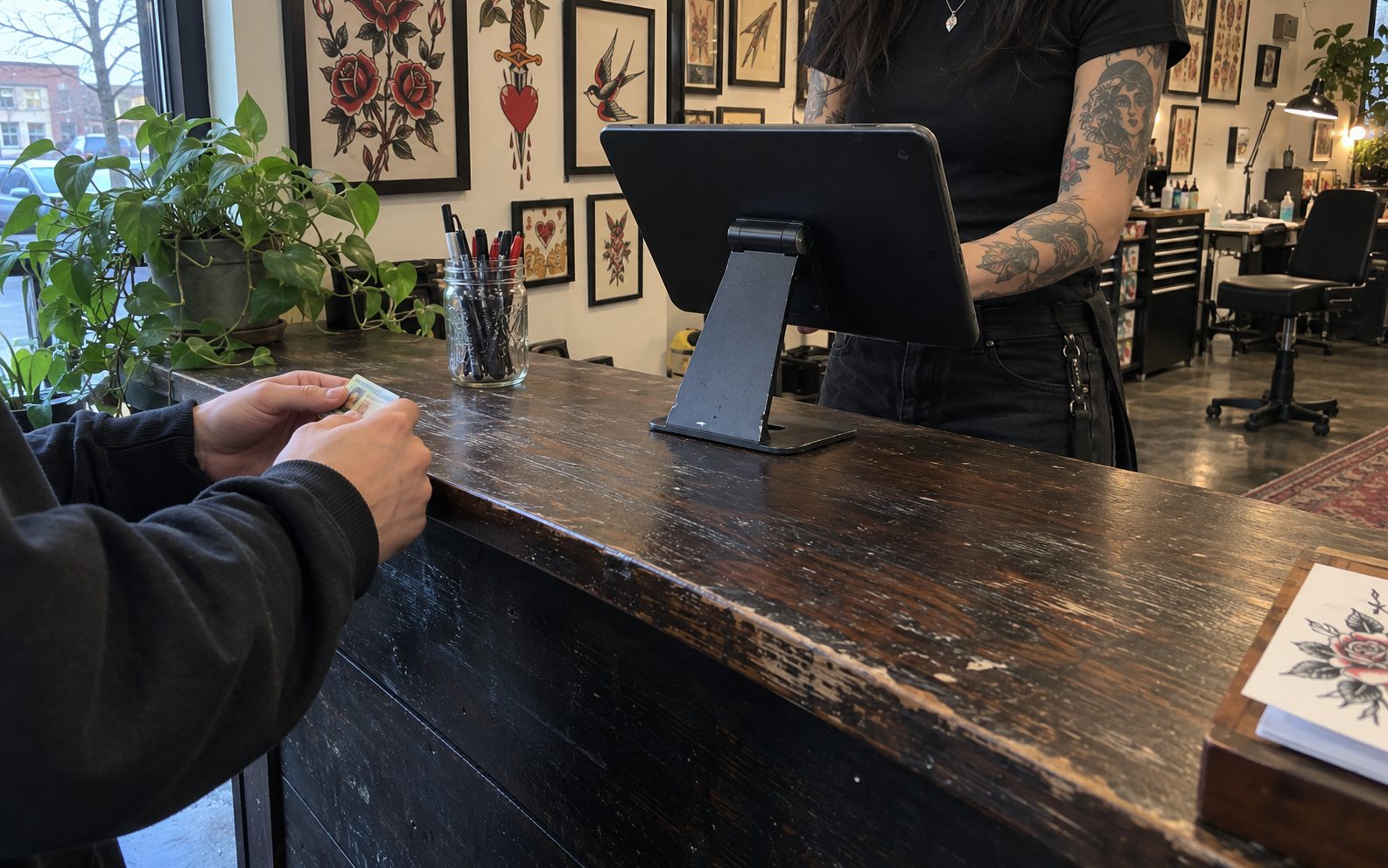
The waiver is your studio's own, signed on the glass. A copy of the exact waiver is stored with the signature. The ID check is signed by whoever looked at the ID. Both land on the client record.

A client holds out their ID at the shop counter, next to the kiosk tablet on its stand
Client record Ray S. · Saturday walk-in
Waiver Signed
ID check · Maya Rivera Verified

Photo consent Portfolio only
Walk-in payment Visa •••• 4242 $249 paid
Paperwork

Every signed waiver also files itself in Paperwork, next to:

DocumentsLicensesBBP certificatesTaxes
Client side · staff side

Staff PIN login

Clients see the check-in screens and nothing else. Staff mode takes a PIN.

Each artist has their own kiosk PIN. Maya enters hers to open artist checkout, keys in the price and turns the screen so Ray picks the tip. Every charge she starts is logged under her name.

The ID check needs a staff PIN too, so every check names who did it. Too many wrong tries locks staff access until a countdown runs out.

Maya Rivera Nina Vos Cal Brennan

Every artist on your roster keeps their own account, clients and flash.

Staff activityToday
MRMaya RiveraCharged on the reader
$249.003:52 PM
MRMaya RiveraLogged in with staff PIN
3:49 PM
MRMaya RiveraID check · Ray S.
2:33 PM
NVNina VosLogged in with staff PIN
1:52 PM
Staff access locked Too many attempts were made. Wait for the countdown before trying again.

Which plan it is on

All of them. Every plan has every feature, kiosk mode included, plus card processing. The plan only changes your booking fee.

Free $0 a month, for good 9.9% booking fee
Plus $39 a month 4.5% booking fee
Pro $99 a month 3.5% booking fee
Ray's walk-in on Plus
  • Flash piece$200.00
  • Booking fee · 4.5% · client pays$9.00
  • Tip · no fee · all Maya's$40.00
  • Ray paid$249 paid
  • $2.50 minimum per payment. A $20 deposit on Free carries a $2.50 fee, not $1.98.
  • The client pays the fee by default. Split it 50/50 or pay it yourself.
  • Card payments go straight to your bank, deposited daily, next business day. US-only for now.
  • Start Free
Kiosk mode · every plan

Have the kiosk ready by Saturday

Bring your crew over in one afternoon. Your clients, bookings and history move with you.

Start Free
Studios · front desk

Kiosk mode for walk-in studios

It's Saturday. Ray S. walks in wanting a piece off the flash wall, and Maya has an hour left on a back piece. Before she's free, Ray needs to sign a waiver, show his ID and get checked in. The kiosk on your counter handles it. Your front desk keeps working.

Start Free
See pricing Kiosk mode is on every plan, Free included.

Tap through the kiosk01 / 07 · Welcome02 / 07 · Walk-in03 / 07 · Confirm04 / 07 · Waiver05 / 07 · ID check06 / 07 · Checked in07 / 07 · Pay07 / 07 · Pay07 / 07 · Pay
Front deskCheck-in
Tattoo studio

Your studio

Maya RiveraNina VosCal Brennan
Book an appointment Browse merchandise
Powered by CREW.INK
Front deskCheck-in
Step 1

Find your appointment

Enter the details used for your booking, or start a walk-in check-in.

Existing appointmentWalk-in
NameRay S.
Email (optional)you@example.com
What happens next
  1. 1The artist will be notified that you're here.
  2. 2Review and sign the studio waiver.
  3. 3Complete any required ID verification.
Front deskCheck-in
Step 2

Confirm your session

Review the walk-in details before continuing.

Session details
ClientRay S.
ArtistMaya Rivera
ServiceCustom session
TimeToday, 2:31 PM
Waiver next. Review and sign the studio waiver.
Front deskCheck-in
Step 3

Read and sign

Studio waiver

I confirm I am 18 or older and the information I give the studio is true.

I understand a tattoo is permanent, that healing takes time, and that I follow the aftercare my artist gives me.

I have told my artist about any condition, allergy or medication that matters for today's session.

Waiver review complete
Do you have a medical condition the artist should know about?
YesNo
Photo consent
Allow portfolio and promotional useAllow portfolio use onlyDo not allow photo use
Signed nameRay S.
SignatureClear
Front deskCheck-in
Step 4

Verify ID in person

Check the physical or digital ID, then record only the verification facts.

Document typeDriving licence
How the ID was checked
Photo ID shown in personChecked in personVerified digital ID
Verified facts I checked the date of birth on the ID. I confirmed the client is 18 or older.
ID attestation · staff PIN

A staff member must enter their kiosk PIN to sign this attestation.

Front deskCheck-in

You're all checked in

Your artist has been notified. Please make yourself comfortable.

ClientRay S.
ArtistMaya Rivera
Checked in at2:34 PM

Returning home in 8 seconds…

Front deskCheck-in
Staff mode · Maya Rivera

Enter your staff PIN

Your PIN opens artist checkout. Every charge you start is logged under your name.

MR
Maya RiveraStaff mode · Artist checkout
Select productsCustom amount
Amount$200.00
Description (optional)Walk-in flash piece
Payment method
Card readerTap, insert or swipe CashCounted at the counter Bank transferWith a verified reference Scan to payClient pays on their phone SplitCash or bank, rest by card Pay by textWe text a secure link
Tip · client chooses100% to Maya
No tip10%$20.0015%$30.0020%$40.00
Turn the screen to the client. Staff never pick the tip.
Walk-in flash piece$200.00
Booking fee$9.00
Tip · 100% to MayaOutside the fee$40.00
Total$249.00

The reader asks the client to tap, insert or swipe.

Card details go to the studio only. Card payments are encrypted.
Front deskCheck-in

Approved

$249.00

Visa •••• 4242 · includes the $40.00 tip for Maya. How do you want your receipt?

The kiosk's home screen. Your artists, and one button for each kind of visit.

Ray is a walk-in. He types his name. Email is optional.

He checks the details before anything gets signed.

He reads the waiver, answers the medical question and signs with a finger.

Maya checks his photo ID at the counter and signs the check with her staff PIN.

Ray is checked in and Maya is notified. He takes a seat.

Later, Maya opens staff mode with her PIN.

She keys in $200 and turns the screen. Ray picks the tip.

Approved: $200 for the work, a $9 booking fee on Plus, and a $40 tip that's all Maya's.

What a kiosk session handles

A session starts when a client taps the screen and ends when they're checked in. Four things happen in between, and none of them need someone at the desk.

  1. Check-in

    Booked clients find their appointment with their booking phone number. Walk-ins type their name.

  2. Waiver

    They read the whole waiver, answer the medical question, pick a photo consent and sign with a finger.

  3. ID check

    Someone on your staff checks the photo ID at the counter and signs the check with their PIN.

  4. Artist notified

    The artist hears the client is here. The client sits down.

Your calendar, your money and your client list stay behind the staff PIN.

A walk-in steps into a tattoo shop; behind the counter, the artist smiles over the kiosk tablet, flash sheets on the wall
The Saturday walk-in

Walk-in check-ins

Ray taps Walk-in, types his name and confirms. No booking, no phone call, no clipboard.

Your Kiosk desk shows him live: which step he's on, which artist he's waiting for and what he owes once the work is priced. Maya sees he's ready before she wraps her session.

Live sessions2 on the desk
Client · flow · stepStatusAction
Ray S.K-2041Walk-in · ID checked · MRMaya Rivera
$200 dueReady to charge
Jess T.K-2042Walk-in · Waiver · NVNina Vos
ActiveStep 3 of 4
The Kiosk desk in your dashboard. Each walk-in shows their step, their artist and what they owe.

Booked solid? Put him on the waitlist. It promotes him automatically when a spot opens.

Waiver signedID checkedWaitlist
A client holds out their ID at the shop counter, next to the kiosk tablet on its stand

Digital waivers and ID capture

The waiver is your studio's own, signed on the glass. A copy of the exact waiver is stored with the signature. The ID check is signed by whoever looked at the ID. Both land on the client record.
Client record Ray S. · Saturday walk-in
WaiverSigned
ID check · MayaVerified
Photo consentPortfolio only
Visa •••• 4242$249 paid
Paperwork

Every signed waiver also files itself in Paperwork, next to:

DocumentsLicensesBBP certificatesTaxes
Client side · staff side

Staff PIN login

Clients see the check-in screens and nothing else. Staff mode takes a PIN.

Each artist has their own kiosk PIN. Maya enters hers to open artist checkout, keys in the price and turns the screen so Ray picks the tip. Every charge she starts is logged under her name.

Staff activityToday
MRMaya RiveraCharged on the reader
$249.003:52 PM
MRMaya RiveraLogged in with staff PIN
3:49 PM
NVNina VosLogged in with staff PIN
1:52 PM
Staff access locked Too many attempts were made. Wait for the countdown before trying again.

The ID check needs a staff PIN too, so every check names who did it. Too many wrong tries locks staff access until a countdown runs out.

Maya Rivera Nina Vos Cal Brennan

Every artist on your roster keeps their own account, clients and flash.

Which plan it is on

All of them. Every plan has every feature, kiosk mode included, plus card processing. The plan only changes your booking fee.

Free $0 a month, for good 9.9% booking fee
Plus $39 a month 4.5% booking fee
Pro $99 a month 3.5% booking fee
Ray's walk-in on Plus
  • Flash piece$200.00
  • Booking fee · 4.5% · client pays$9.00
  • Tip · no fee · all Maya's$40.00
  • Ray paid$249 paid
  • $2.50 minimum per payment. A $20 deposit on Free carries a $2.50 fee, not $1.98.
  • The client pays the fee by default. Split it 50/50 or pay it yourself.
  • Card payments go straight to your bank, deposited daily, next business day. US-only for now.
Start Free
Kiosk mode · every plan

Have the kiosk ready by Saturday

Bring your crew over in one afternoon. Your clients, bookings and history move with you.